

Pay your rent from your phone
The free Autorentic app shows every bill from your property manager, lets you pay online in a few taps, and keeps your receipts and tenancy agreement in one place.
- Free for tenants
- Android first, iPhone next
- English and Bahasa Melayu
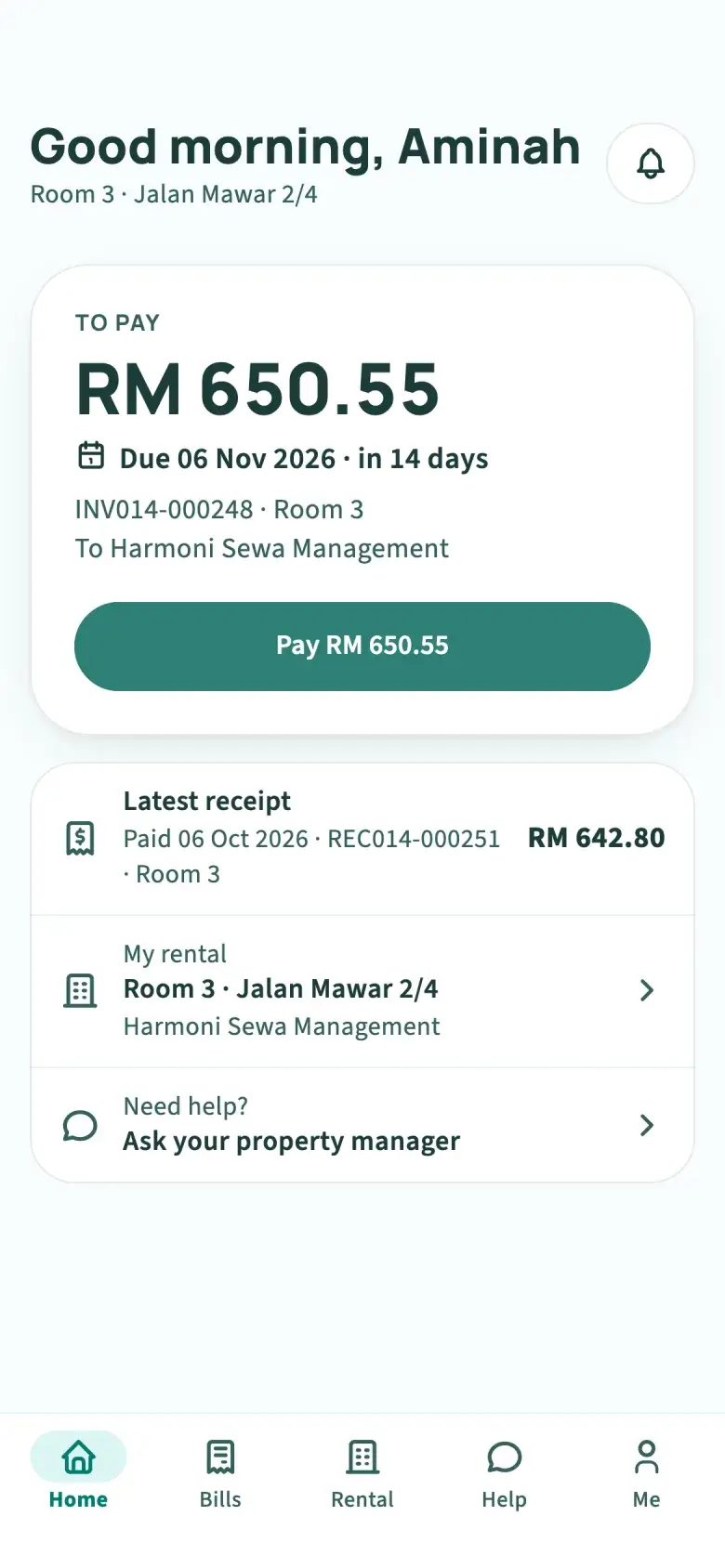
“Salam. Sewa bulan Nov: , , . Bank in sebelum 6hb ya, lepas tu send resit.”
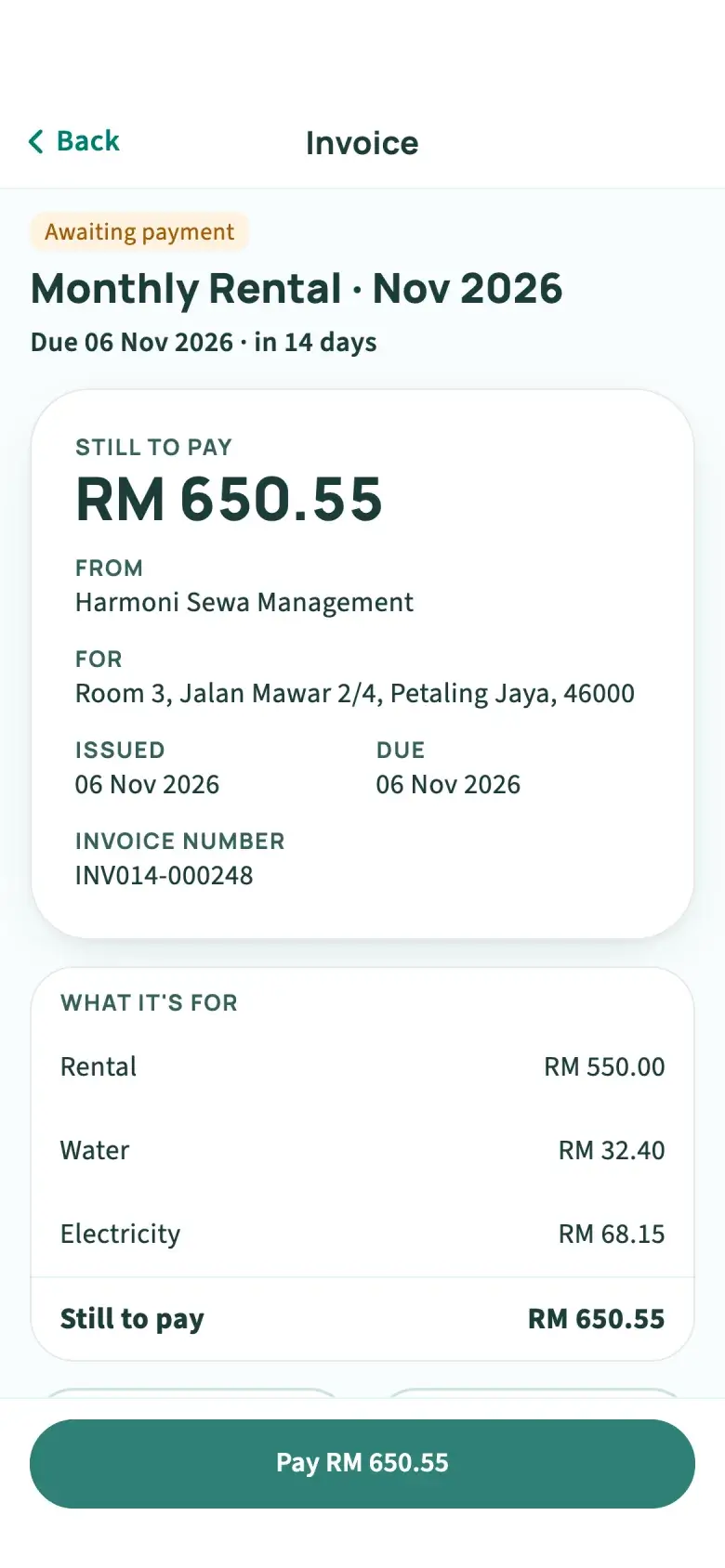
This is how rent often arrives: a message, a bank account to copy and a screenshot to send back. Tap any amount in teal to change it, and the bill follows, the way the app shows it.
From a text to a bill
One month of rent
The bill comes to you, with the date in words.
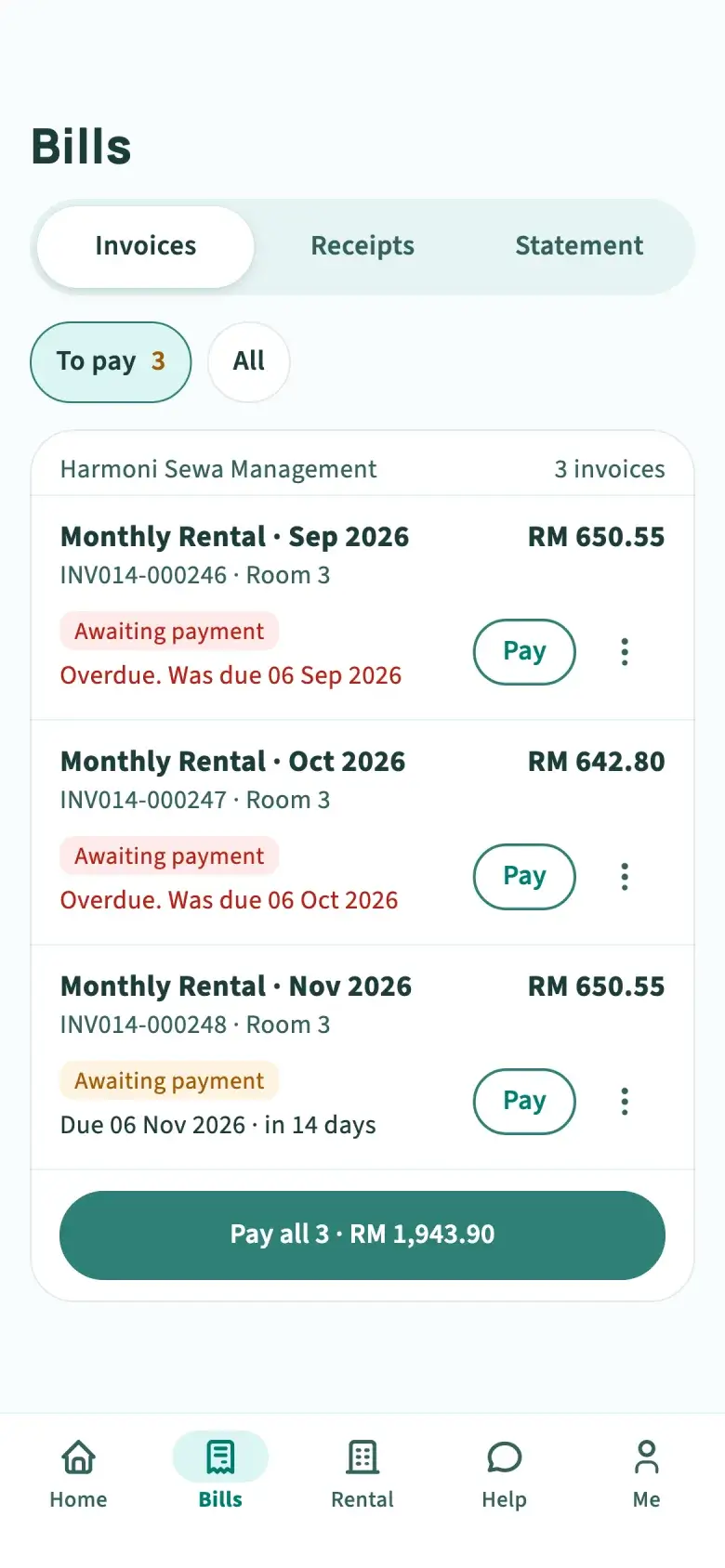
When your property manager issues a bill in Autorentic, it is on your Home screen. Overdue bills sit on top, oldest first, so nothing hides under newer ones.
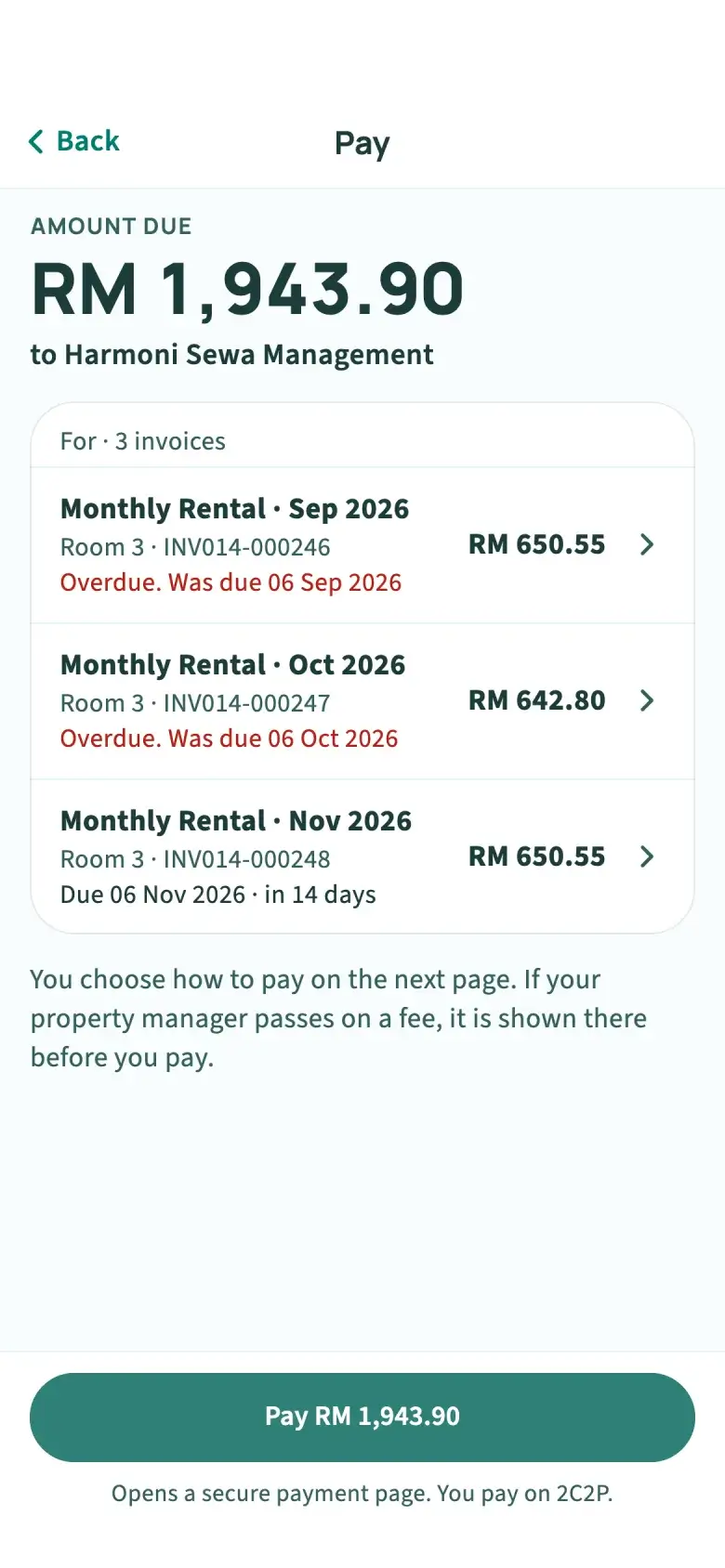
Then pay several months in one go.
Pick up to 20 bills from the same property manager and pay them together in one payment. It happens on 2C2P’s secure page, so your bank and card details never enter the app.
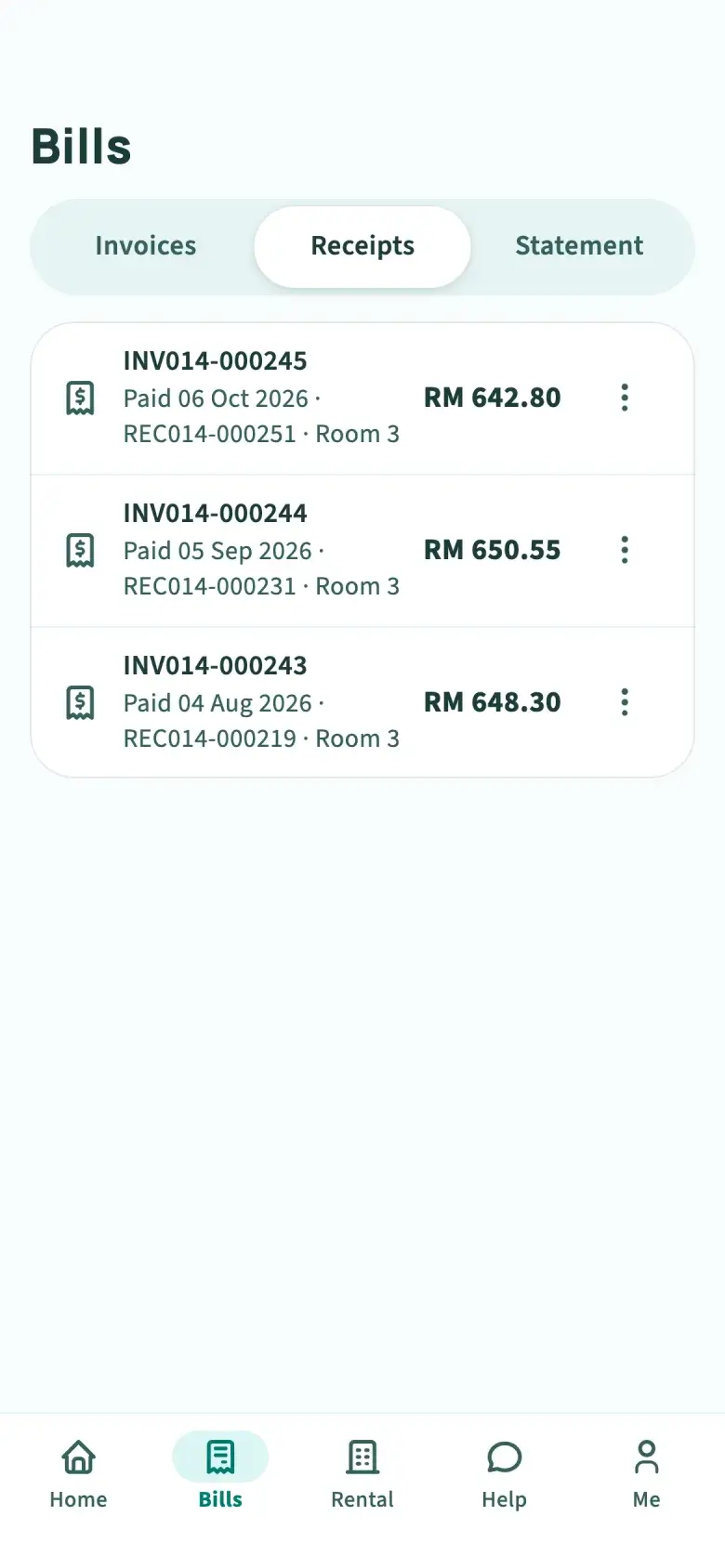
Then the receipt is yours to keep.
Once the payment clears, a receipt is issued and your statement of account updates. Share the PDF on WhatsApp or email if anyone asks for proof.
Everything about your tenancy
Bills are only half of renting. The rest of what you and your property manager share lives in the same app, under five tabs: Home, Bills, Rental, Help and Me.
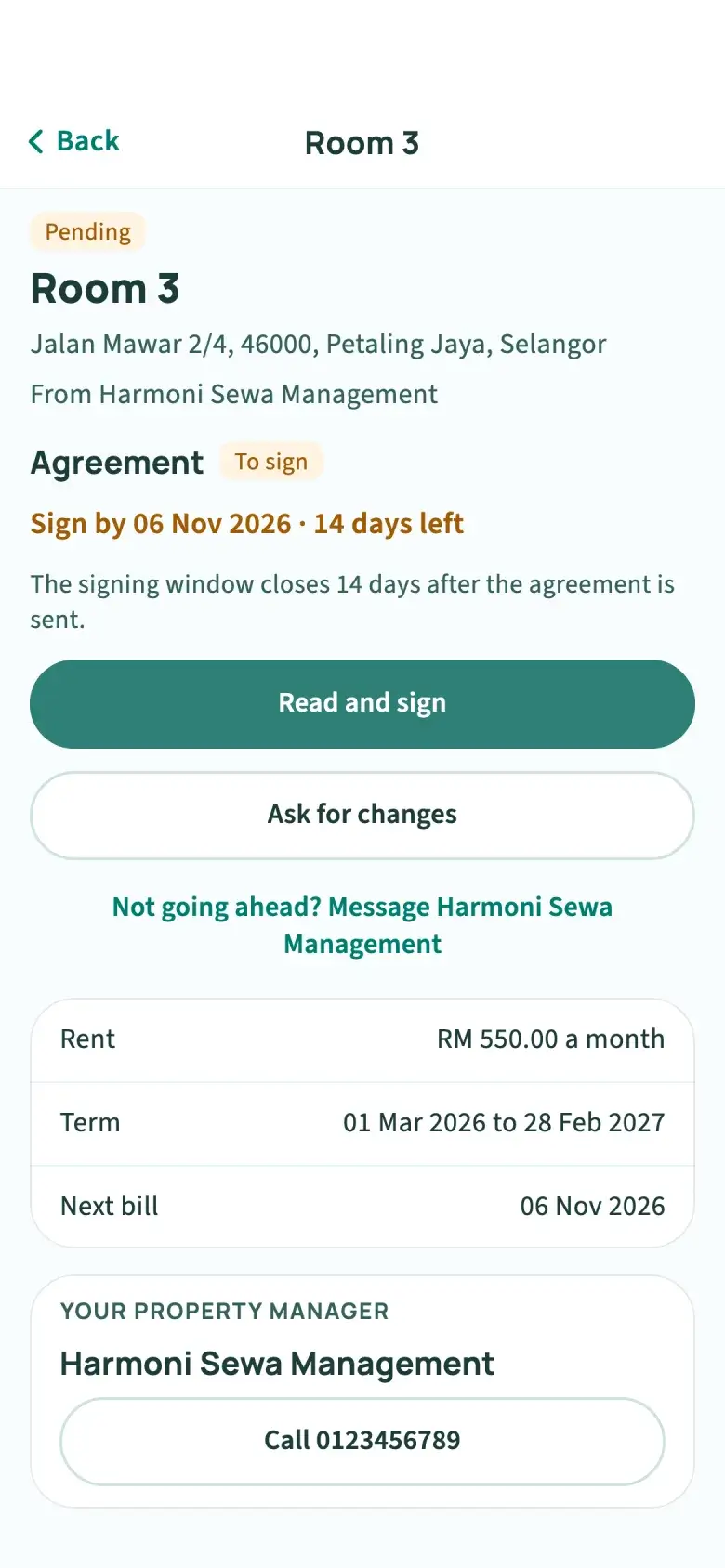
Sign your agreement on the phone
Read the agreement, then draw your signature or type your name. Renewals arrive the same way, with the new rate and dates side by side. Available when your property manager signs agreements online.
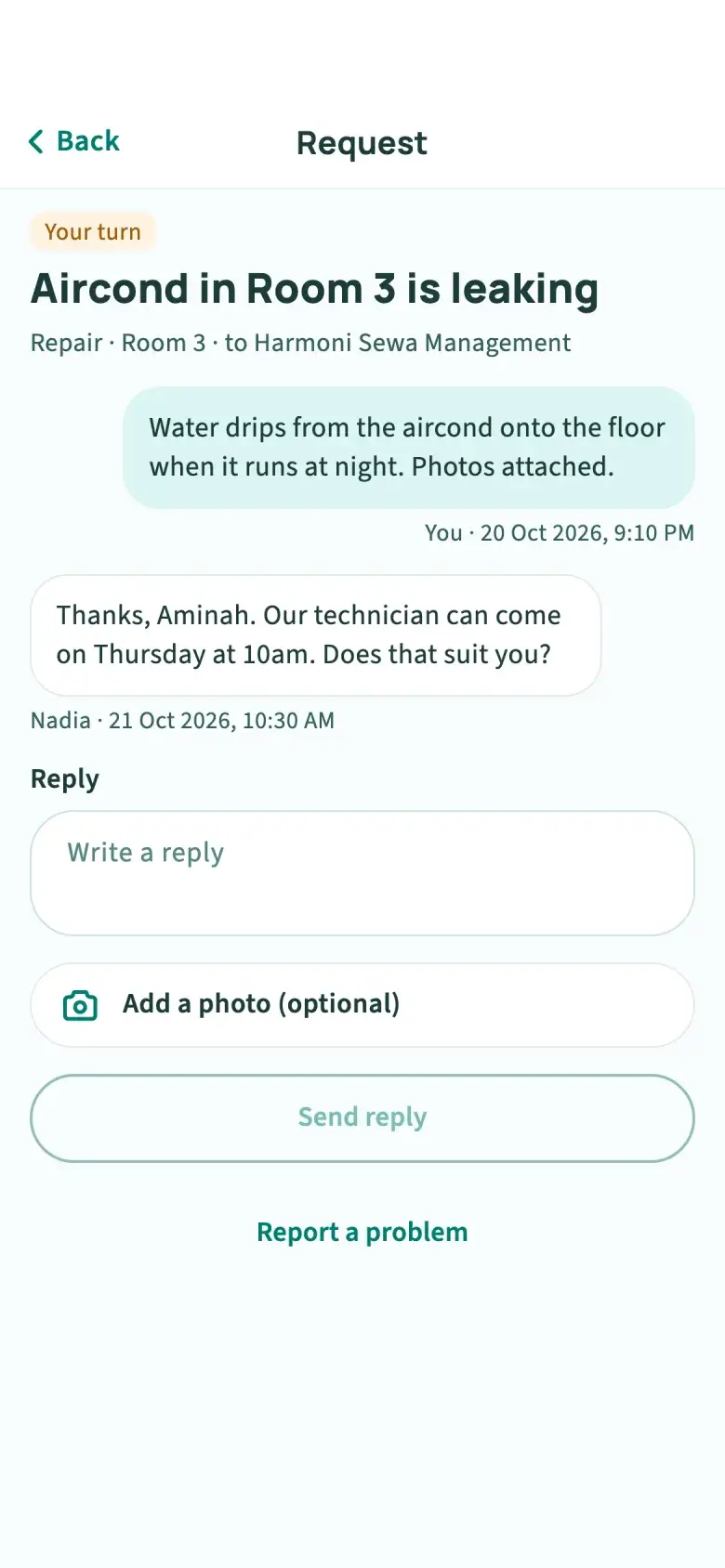
Report a repair with photos
Send a request to your property manager with photos or a PDF, then follow the replies in one thread instead of a chat that scrolls away.
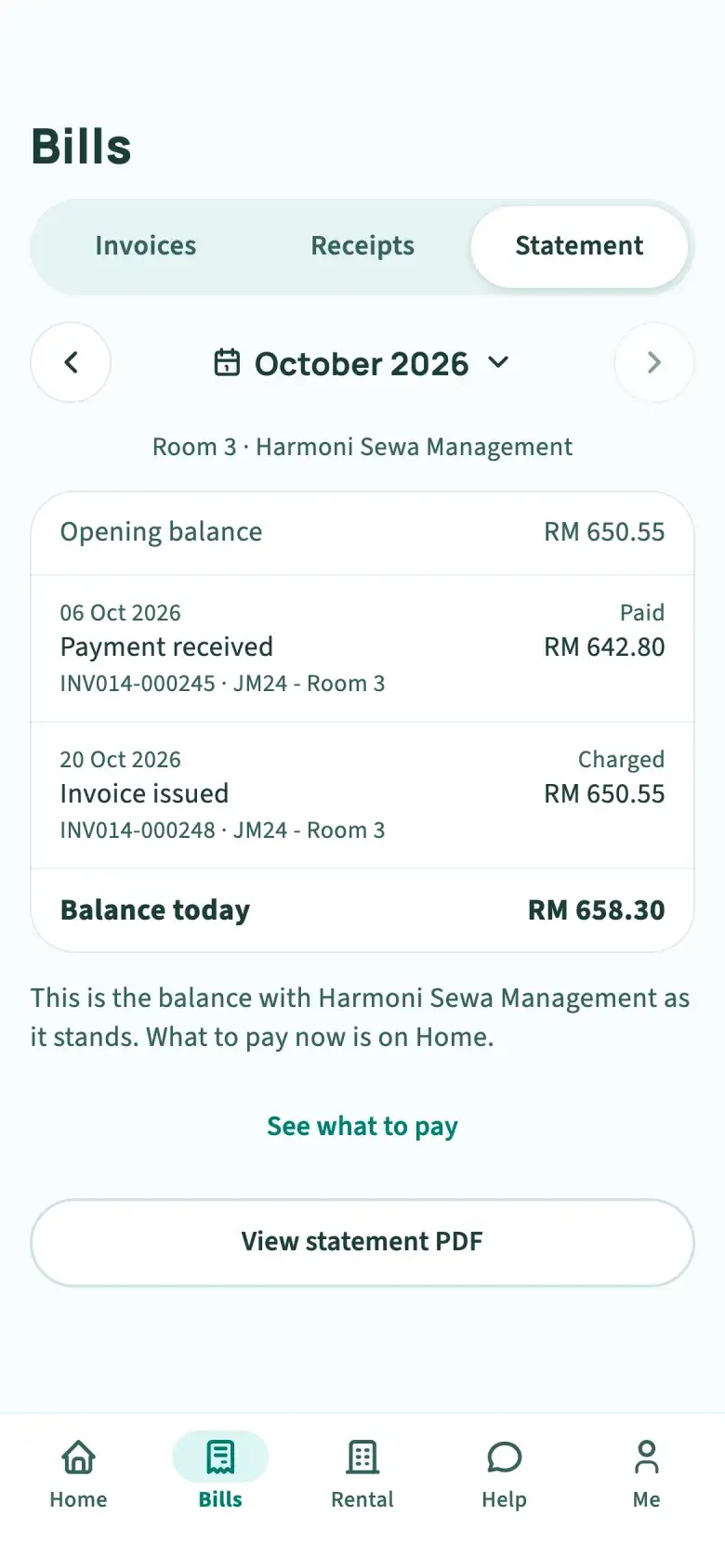
Know your balance, month by month
Your statement of account shows every bill and payment with your property manager, a month at a time, with a PDF to keep. If you rent from two managers, each has their own bills, receipts and statement.
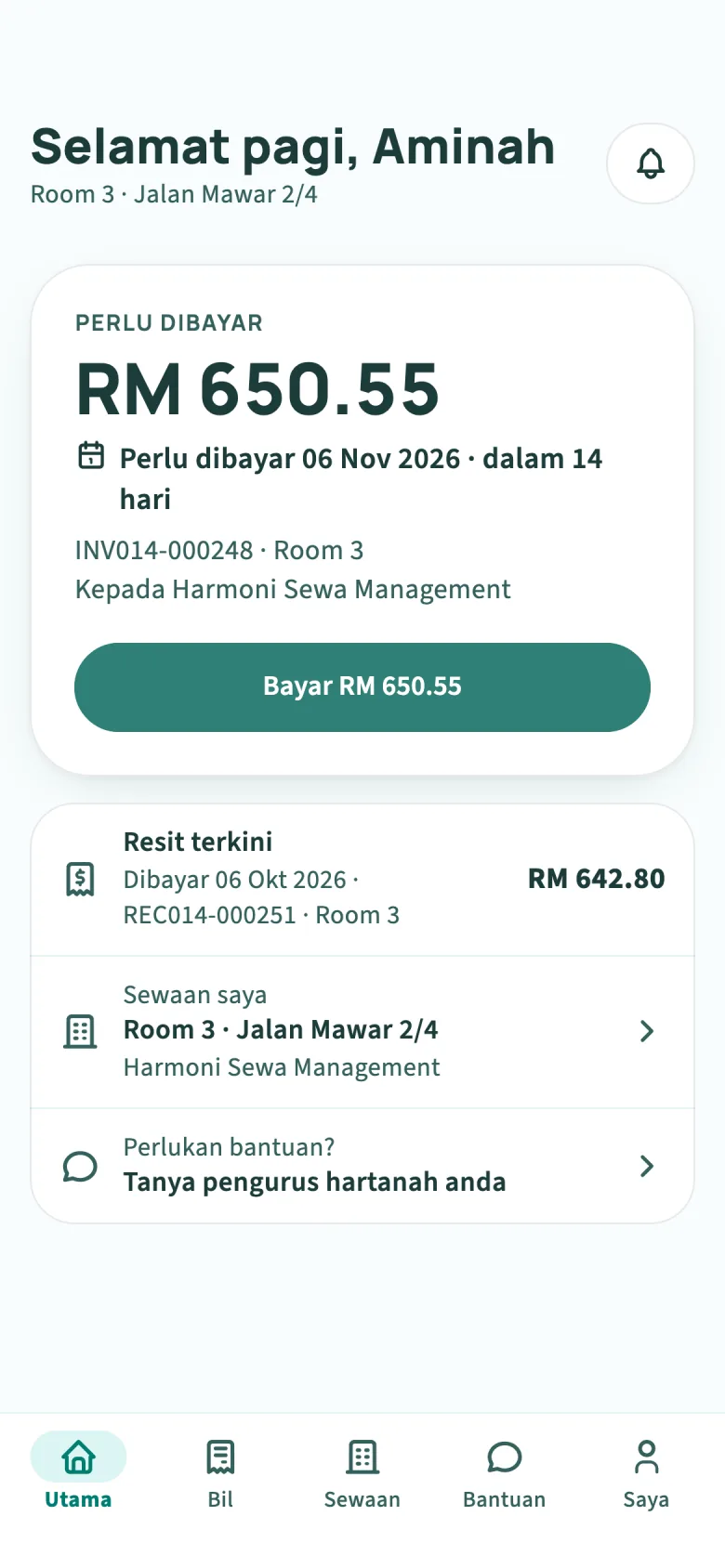
In English or Bahasa Melayu
The app follows your phone’s language, and you can switch it in one tap on the sign-in screen or under Me. Bill titles show as your property manager wrote them.
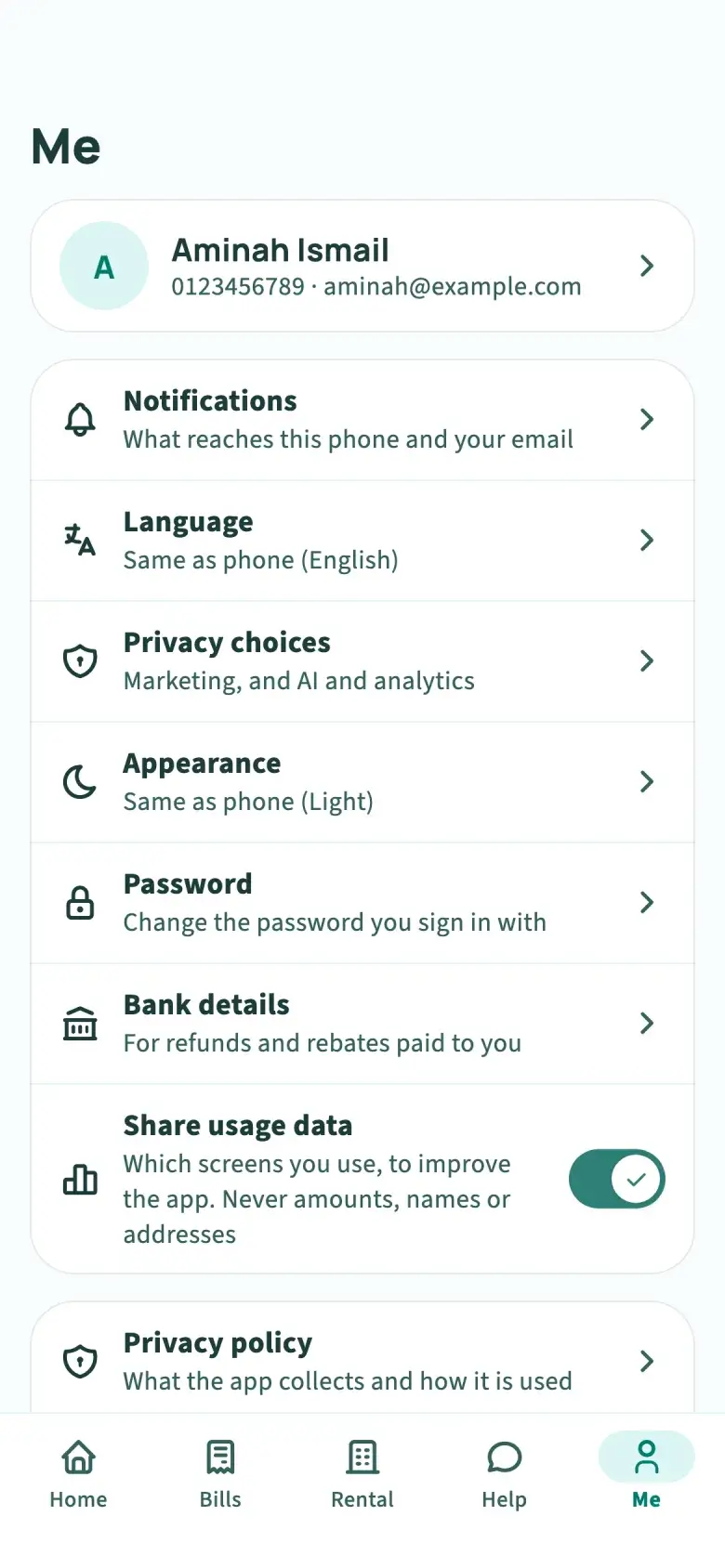
Your account stays yours
Your sign-in is kept in your phone’s secure storage. You can switch off usage data, and delete your account from the app once your tenancies have ended and no overdue bill is left.
Bank transfer or the app?
Many tenants still pay by transfer and send a screenshot. Here is what changes when your property manager’s bills come through Autorentic.
| Task | Transfer and a message | Autorentic app |
|---|---|---|
| Knowing what you owe | Added up from chat messages | Every unpaid bill in one list, with the total |
| Paying | Copy an account number into your bank app | Tap Pay and finish on 2C2P’s secure page |
| Paying for several months | One transfer and an explanation | Up to 20 bills in one payment |
| Proof of payment | Screenshot sent by hand | Receipt issued for you, as a PDF |
| Your history | Scattered across chats and bank statements | Statement of account for each month |
| Tenancy agreement | Printed, signed and scanned | Signed on your phone, where your manager signs online |
Ways to pay
Every bill
FPX online banking
From a personal or business account at any Malaysian bank on FPX.
When your property manager turns them on
- Credit card
- DuitNow
- Touch ’n Go
- GrabPay
- ShopeePay
- Boost
- Alipay
- WeChat Pay
The payment page shows the methods your manager offers, and any payment fee they pass on, before you pay.
Rent due at night? Pay it from the sofa in under a minute.
Open the billSee what it is for, line by line.
Pay several at onceOne payment for the bills you choose.
Keep the receiptIssued for you, ready as a PDF.
Questions tenants ask
Updated 23 October 2026
Still not sure? Your property manager can answer anything about your bills and tenancy. To see them for yourself, sign in on the web today.
Sign in on the webGetting started
Is the Autorentic app free?
Yes. Tenants pay nothing to download or use it. When you pay a bill, a payment fee may apply if your property manager passes it on, and it is shown on the payment page before you pay.
How do I get an account?
Your property manager creates it when they add you as a tenant in Autorentic. Sign in with the email address they have for you. There is no separate sign-up for tenants.
I have never set a password. How do I sign in?
Tap “Can’t sign in?” on the sign-in screen. We email you a link to set a password, which also works if your manager made your account or you usually sign in with Google or MyDigital ID on the web.
My property manager does not use Autorentic. Can I still use the app?
Not yet. The app shows bills your property manager issues through Autorentic. Share this page with them: Autorentic is free for property managers with up to 10 tenants.
Is the app on iPhone?
Android comes first on Google Play, and iPhone follows. Until then, sign in at app.autorentic.com in any browser with the same account.
Paying
How do I pay my rent in the app?
Tap Pay. The app opens 2C2P’s secure payment page in your phone’s browser, where you pay by FPX online banking, or by card, DuitNow or e-wallet if your property manager has turned them on. Then you come back to the app, which checks the result.
Is it safe to pay through the app?
Your card and bank details go into 2C2P’s payment page, not into the app, and the app never stores them. Your sign-in is kept in your phone’s Keychain or Keystore.
Can I pay several months at once?
Yes, up to 20 unpaid bills from the same property manager in one payment. A bill your manager split into parts is paid on its own.
Where do I find my receipt?
Under Bills, in Receipts, as soon as your payment clears. Each one opens as a PDF you can share or save. Your statement of account is there too.
Your account
Does the app work in Bahasa Melayu?
Yes. It follows your phone’s language, and you can switch between English and Bahasa Melayu on the sign-in screen or under Me.
Can I sign my tenancy agreement in the app?
Yes, when your property manager signs agreements online. You read it, then draw your signature or type your name, and the app shows who still has to sign.
How do I delete my account?
Go to Me and choose Delete account. It can be deleted once every tenancy has ended and no bill past its due date is left unpaid; otherwise the app tells you who to contact.
See what you owe
Sign in with the email your property manager has for you. Your bills, receipts and agreement are already there, on the web today and in the app as soon as it reaches your store.
Property manager? Every tenant you add gets the app. Try Autorentic for free or see all features.