Transfer Convenience Fees allows property managers to transfer applicable convenience fees to tenants when they make rental payments through Autorentic.
By default, convenience fees are borne by the property manager. When this function is activated, the applicable convenience fees will be shown to the tenant during payment before they confirm the transaction.
Convenience fees help support Autorentic’s continuous development, payment infrastructure, automation features, and ongoing support for property managers.
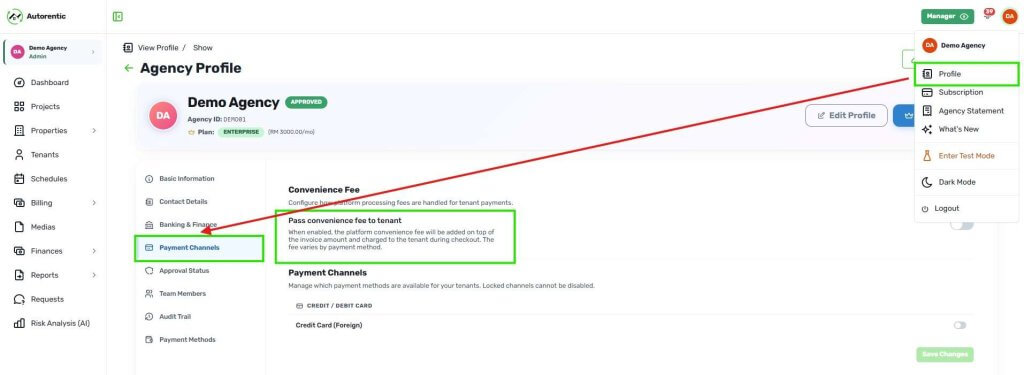
Where is the setting located?
How to activate it?
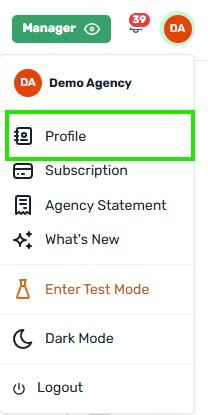
1. Click on your Avatar.
2. Click ‘Profile’.
3. Click ‘Payment Channels’.
4. Enable the ‘Pass convenience fee to tenant’ by click the button beside it. When it turns green instead of grey, it is enabled.
What happens after activation?
Once activated, depending on the Plan subscribed by the Property Manager and the payment channel chosen by the tenant (refer to Pricing plan), the tenant will see the applicable convenience fee before making payment.
Example Calculation
Rental Amount RM 1,500.00
convenience Fee (Alpha Plan) 1.00%: RM15.50
Total payable by the tenant: RM1,515.50 (RM1,500.00 + RM15.50)
Total disbursed to PM: RM1,500.00
Example Invoice Payment
How to disable it?
1. Refer back to “How to activate it” steps 1 to 3 to get back to the “Pass convenience fee to tenant” page.
2. Click the toggle beside “Pass convenience fee to tenant”. Make sure it is grey, the fees will then be absorbed by the Property Manager.