
How to Use Test Mode
Test Mode gives you a safe, sandboxed environment to explore Autorentic’s features without touching your real agency data. It creates a separate test agency pre-loaded with sample data so you can try everything from invoicing to ticket management, risk-free.
Enter Test Mode
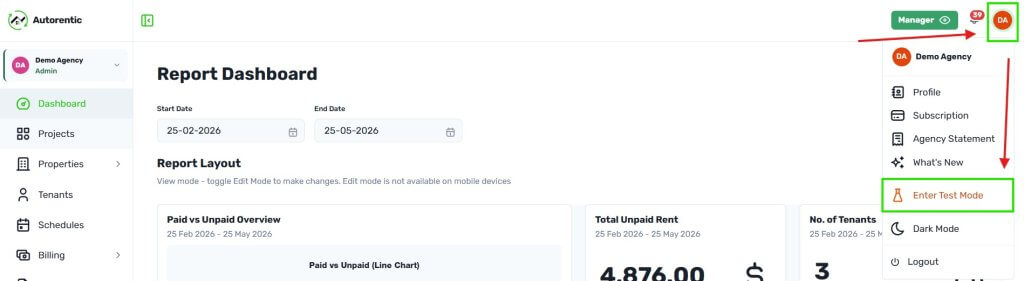
- Click on your Avatar.
- Click ‘Enter Test Mode’.
Important notes:
- In Test Mode, all actions you perform from this point: creating invoices, adding tenants, managing properties are within the sandbox. Your real agency data is not affected.
- Real payments, emails, invitations, and LHDN submissions are blocked in Test Mode.
- Sample data is pre-loaded — Your test agency comes with auto-generated properties, tenants, and invoices so you can explore features immediately. This data is fictional and not sourced from any real accounts.
- Test Data expires after 7 days — your test agency is automatically removed. You can create a new one anytime.
- Team Members cannot see your test agency — it is private to your account only.
How to determine you are in Test Mode
- You will see a persistent orange banner at the top of every page to remind you, you are in Test Mode.

Functions in the Middle
- There are ‘Explore Features’, ‘Reset Data’ and ‘Exit Test Mode’.

Explore Features – 6 interactive walkthroughs:
- Payment Flow – What tenants see after paying (success/failure states)
- Email Templates – System emails rendered with test data (PM + tenant emails)
- Tenant Portal – What tenants see when they log in (invoice list, detail, pay button)
- Property Overview – PM’s property card layout (rental rate, tenant counts)
- Contract Lifecycle – PM’s contract timeline and status tracking
- Ticket Management – Ticket flow from both tenant submission and PM response
Reset Data – Resets your test agency to its original sample data. Use this anytime you want a fresh start without
waiting for the 7-day auto-cleanup.
Exit Test Mode – Returns you to your real agency. Your test agency remains available to re-enter anytime within the
7-day window.